Categories
The page listing your video categories, and the slug at the start of every category URL.
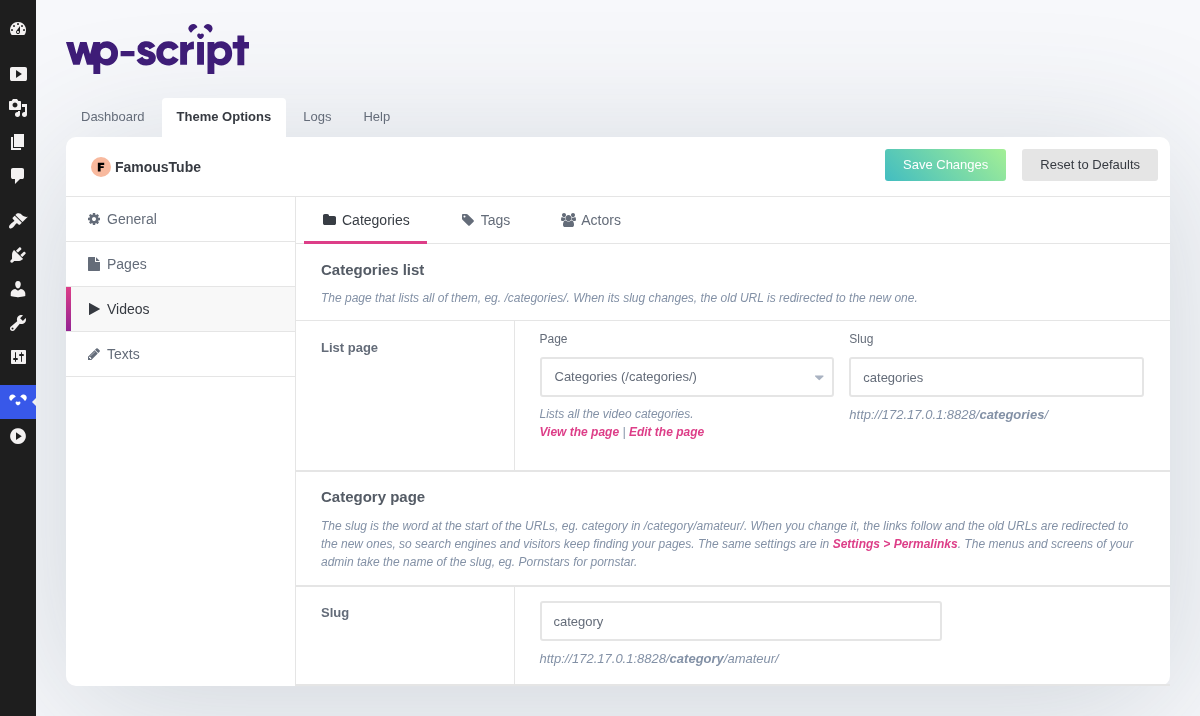
1. Categories List

The page that lists all your categories, /categories/ by default.
2. List Page

- Page: the page used as the categories list. Only the pages using the Categories template are offered. When other pages use that template, they are listed with View and Move to trash, and Create it recreates the page when it is missing.
- Slug: the end of its URL. When it changes, the old URL is redirected (301) to the new one.
3. Category Page

The archive of one category. Its URL starts with the category slug, category
by default, as in /category/amateur/.
4. Slug

Type the word you want at the start of your category URLs. The links of your site follow, and the old URLs are redirected (301) to the new ones, so search engines and visitors keep finding your pages. The admin menus take the name of the slug too.
This is the same setting as Category base in Settings → Permalinks: change it in either place. A slug already used by another slug of the theme is refused, with a notice.