General
How many videos a listing holds, how thumbnails are shaped, and which of the theme's systems are running.
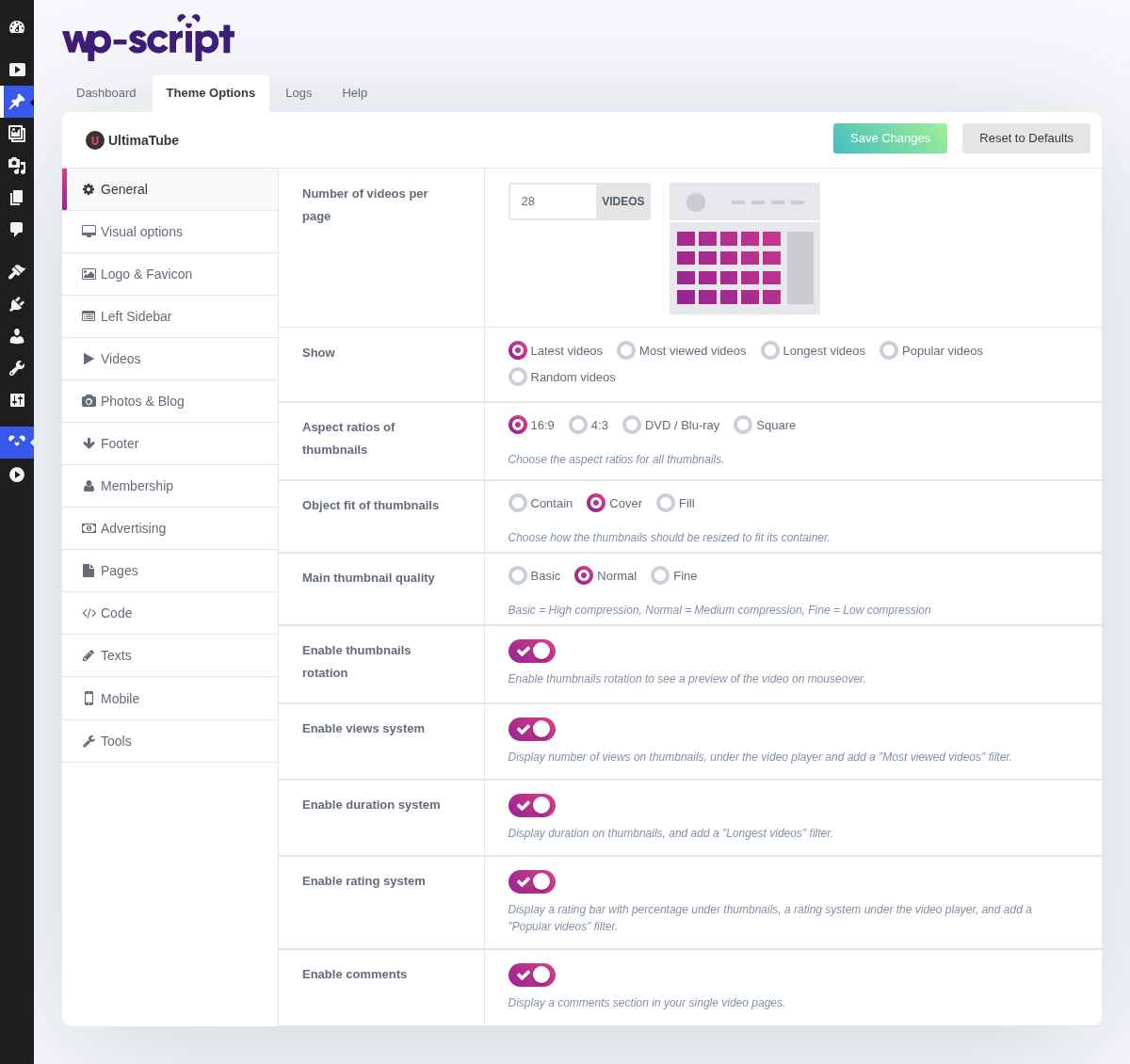
1. Number Of Videos Per Page

Pick a figure that divides evenly by the number of thumbnails a row holds, so the last row of a listing is never half empty.
Phones have their own value, in Mobile → General, and it should be lower: every thumbnail is a download on a connection you do not control.
2. Show

This is the default order of every archive on the site, not just the homepage. Latest is the honest choice on a site that publishes often; most viewed or popular suits a catalogue that has stopped growing but still gets traffic.
3. Aspect Ratios Of Thumbnails

Choose the aspect ratios for all thumbnails.
The ratio decides the shape of every thumbnail, and the next option decides what happens to an image that does not match that shape. The two are one decision.
4. Object Fit Of Thumbnails

Choose how the thumbnails should be resized to fit its container.
cover crops the image to fill the shape, which keeps the grid tidy at the
cost of the edges. contain fits the whole image inside and pads the rest,
which keeps everything visible at the cost of a ragged grid.
On a tube, cover is almost always right: a uniform grid is what makes a
catalogue readable, and your thumbnails come from a dozen different sources.
5. Main Thumbnail Quality

Basic = High compression, Normal = Medium compression, Fine = Low compression
A compression setting. It applies to the thumbnails the theme generates, so a change only shows on images processed after it.
Lower it if your listings are slow on mobile connections, which is where most of a tube's traffic is.
6. Enable Thumbnails Rotation

Enable thumbnails rotation to see a preview of the video on mouseover.
7. Enable Views System

Display number of views on thumbnails, under the video player and add a "Most viewed videos" filter.
Turning it off removes a way of browsing your site, not just a badge: the "Most viewed" filter goes with it.
8. Enable Duration System

Display duration on thumbnails, and add a "Longest videos" filter.
The figure comes from the duration you set on each video in Video Information. A video with no duration shows no badge while its neighbours keep theirs.
9. Enable Rating System

Display a rating bar with percentage under thumbnails, a rating system under the video player, and add a "Popular videos" filter.
The rating feeds the "Popular" filter, so it is worth keeping even on a site with little traffic. Votes are anonymous and need no member account.
10. Enable Comments

Display a comments section in your single video pages.
The one switch here worth a decision rather than a default. An unmoderated comment section on an adult tube fills with spam within days, and an empty comment box under every video makes a site look less alive, not more.
If you keep them, set WordPress itself to hold comments for approval, at Settings → Discussion.