Auto Import
Auto Import lets WPS Mass Embedder fetch and publish new videos on a schedule, without you running a manual search. Enable it, then configure how much content gets imported and how often.
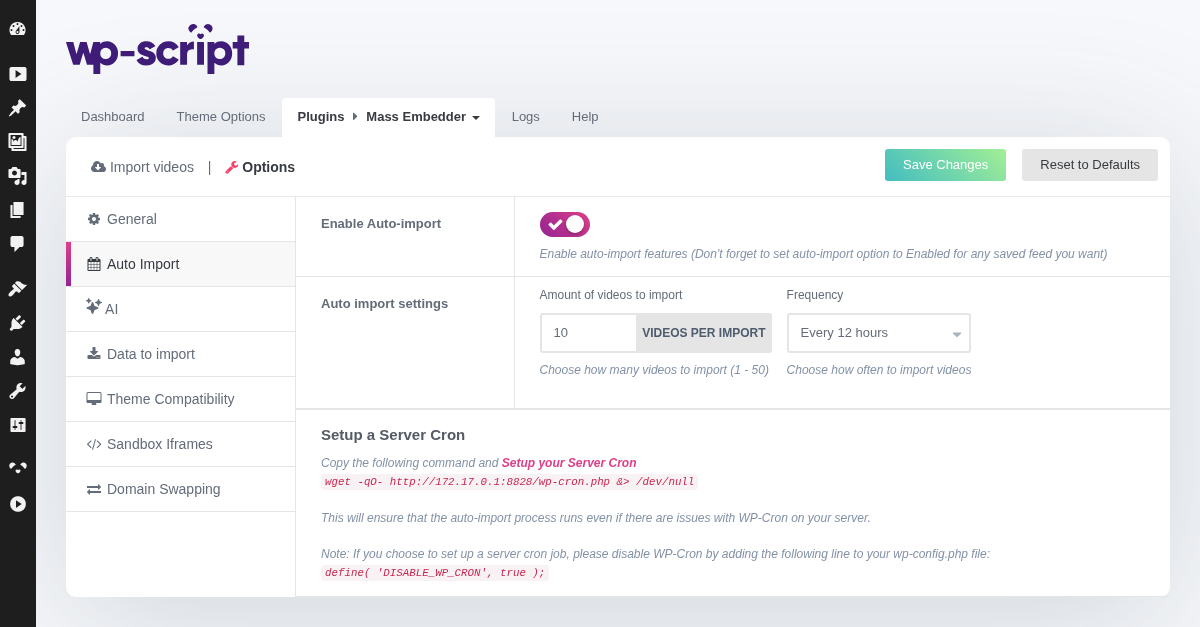
1. Enable Auto-import

Enable auto-import features (Don't forget to set auto-import option to Enabled for any saved feed you want)
2. Auto Import Settings

Once auto-import is enabled, two settings become available:
- Amount of videos to import: how many videos are imported per run, from 1 to 50 (default: 10).
- Frequency: how often the import runs, from every hour up to every 24 hours (default: every 12 hours).
Auto-import relies on WP-Cron, which only fires when your site receives visits. On low-traffic sites this can make imports run late or skip a cycle. If that happens, set up a real server cron job (a wget call to /wp-cron.php at a fixed interval) instead of relying on WP-Cron, and disable WP-Cron in wp-config.php with define( 'DISABLE_WP_CRON', true ); so the two don't run twice.
Each saved feed also has its own auto-import toggle, so enabling this global setting only actually imports feeds that have auto-import turned on individually.
3. Setup A Server Cron
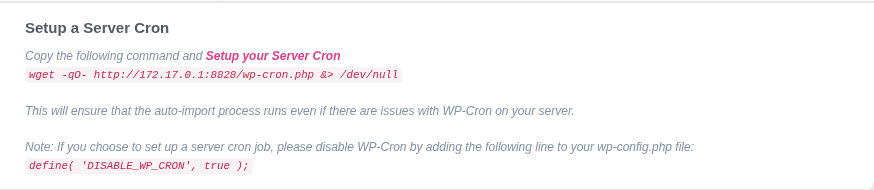
Copy the following command and Setup your Server Cronwget -qO- http://172.17.0.1:8828/wp-cron.php &> /dev/nullThis will ensure that the auto-import process runs even if there are issues with WP-Cron on your server.Note: If you choose to set up a server cron job, please disable WP-Cron by adding the following line to your wp-config.php file:define( 'DISABLE_WP_CRON', true );